CRiverside trail opens✕
WEasy Chili Recipe✕
+
dailycourier.example.com/local/riverside-trail
recipes.example.com/easy-chili
homepagecloud.com/dashboard
chromewebstore.google.com/detail/homepagecloud/dhdmcafifhjlncnpknjmbokkgcmhepcn
 A
⋮
The Daily CourierLocalWorldSportsWeather
LOCAL
Riverside trail opens
Most read
- Library hours extended for the summer
- Farmers market returns on Saturday
- Bus route changes start Monday
Weeknight KitchenDinnersSoupsBakingQuick & Easy
Dinners › Chili
Easy Chili Recipe
Ingredients
- 1 lb ground beef
- 1 onion, chopped
- 2 cans kidney beans
- 1 can crushed tomatoes
- 2 tbsp chili powder
- 1 tsp cumin
- Salt and pepper
Saved
Chrome Web StoreSearch extensions and themesDiscoverExtensionsThemes

HomePageCloud
Offered by homepagecloud.com · Productivity
Add to ChromeFreeOverviewPrivacy practicesSupport
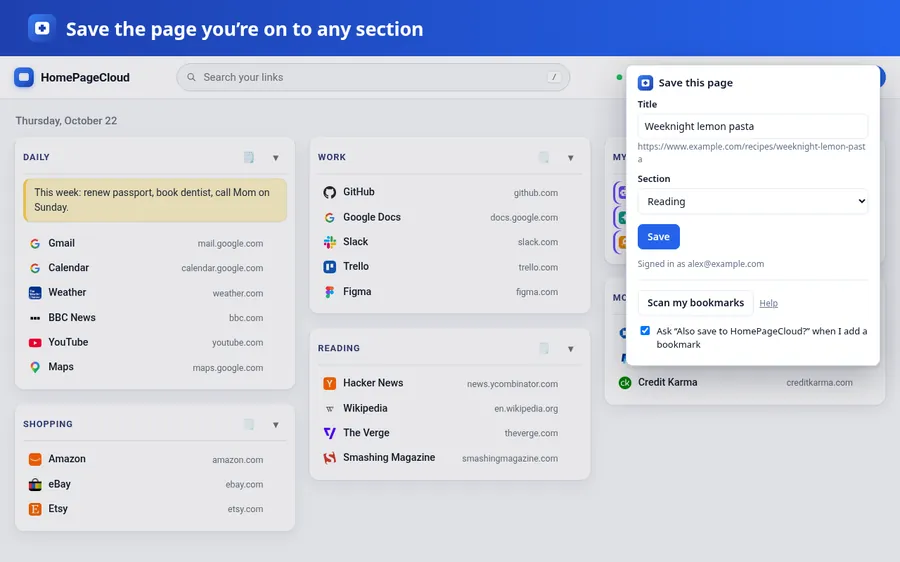
Save pages to your homepage in one click.
Click the toolbar button on any page, pick a section, and it lands on your HomePageCloud page.
Add a bookmark the usual way and it asks if you'd like to save it to HomePageCloud too.